
Playrooms Backrooms Cleanup and Couch Location
Explore the yellow Backroom in Playrooms with tips for unlocking tools, retrieving the corridor couch, finding sparrows, and returning before blackout.
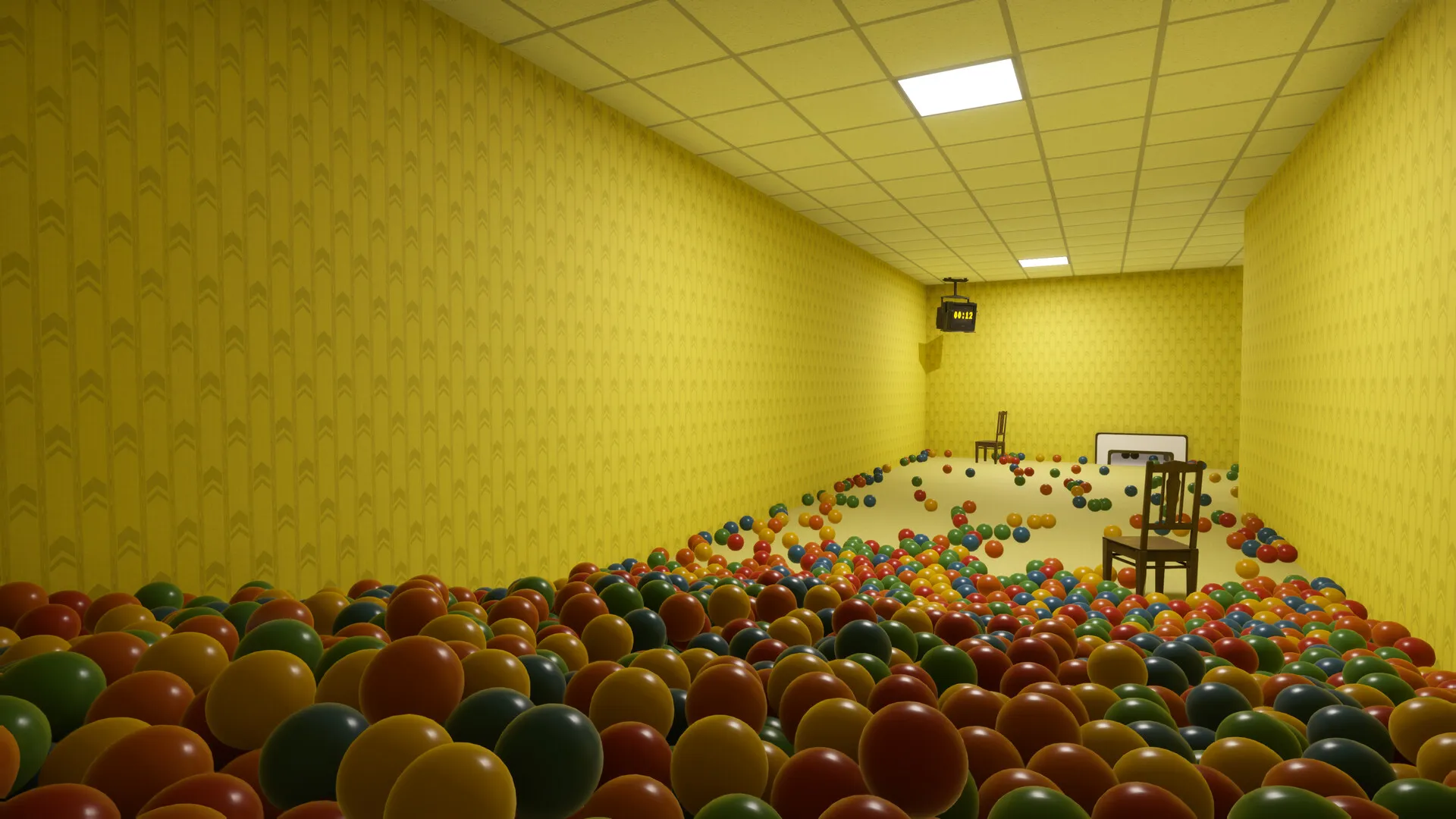
What should you do first in the Playrooms Backroom?
The long corridor in Playrooms backrooms has a collectible couch at its far end, but reaching it is only half the trip. Your return matters because the lights shut down after the shift, and the recorded Normal-mode attempt lost the couch when the player died. This Playrooms backrooms guide explains how to prepare for that run, set up cleaning equipment, and track the area’s furniture and sparrows.
The focus here is the yellow area called Backroom in Playrooms. The game’s basic progression connects cleaning, earnings, equipment, and keys: storing balls helps fund your next purchases, while filling ball pits unlocks abilities.

Playrooms - Episode 1 - Full Game Release! — FalconPlaysGamesOfficial
Video source: Playrooms - Episode 1 - Full Game Release! — FalconPlaysGamesOfficial.
General full-release gameplay reference. This is not a dedicated tutorial, device test, or proof of this article’s particular mechanic. Exact patch is not identified.
This guide covers the Windows Steam full release by Two Pixels UG, released November 4, 2026. Those availability details come from the official Playrooms Steam listing.
Gameplay details below are labeled player experience and come from the reviewed launch-period full-game recording. Its exact patch number is unconfirmed, so observed prices and behavior should be checked against your game. Collectible lists come from community reports, with missing location details identified where relevant.
Start by establishing a working collection route and learning the return journey. The distant furniture run becomes much more manageable after movement and shift upgrades.

THE BACKROOMS NEED CLEANING, WE'RE THE GUY | Playrooms FULL GAME PART 1 — Sonoket Gaming
Earlier full-game review-copy playthrough — Sonoket Gaming. Published October 30 before public launch. The dated observations attributed to this recording are not a demonstration of the November 6 patch.
Unlock the Backroom and budget for its equipment
In the reviewed player experience, the Backroom opens after the Waiting Area. Buying its key also makes additional equipment and upgrade levels available, giving you a reason to unlock it even while earlier cleanup remains unfinished.
The important budgeting lesson is that the key does not cover every setup cost. The player entered the Backroom without enough money to activate its collection vent and had to earn more before that equipment became useful.
These are observed in-game prices from the Sonoket Gaming full-game playthrough, not a verified price list for every subsequent patch.
| Purchase | Observed cost | Purpose |
|---|---|---|
| Backroom key | $25 | Opens the area and additional progression options |
| Backroom vent activation | $5 | Enables the fixed collection point |
| Ball vacuum | $20 | Provides a movable collection and upload tool |
The streamer initially remembered the key as costing $20, then corrected that estimate after checking it. Use the displayed price when planning purchases.
For your first Playrooms backrooms shift, locate the vent, identify the route back to the break room, and check the available timer display before committing to a distant section. In the recorded run, activating a timer screen cost in-game money, but seeing the remaining time made work much easier to manage.
Keep enough money for the collection equipment you intend to use. An upgrade that moves larger piles has limited value if you cannot yet deposit those piles efficiently.
Clean the Backroom with the broom, vent, and ball vacuum
The strongest Playrooms backrooms cleaning lesson from the player experience is that the tools work together. The broom moves large groups, the vent processes a fixed collection point, and the portable ball vacuum reduces repeated trips from more distant piles.
The vacuum initially disappointed the player because its basic behavior was misunderstood. It can receive balls collected by hand and upload them to the pits. Its first Intake Speed upgrade enables suction mode, after which placing it near loose balls becomes much more useful.
| Tool or upgrade | Behavior shown in player experience | Practical use |
|---|---|---|
| Push broom: Load | Increases how many balls the broom can push | Move larger groups through open sections |
| Push broom: Push Tempo | Improves movement while pushing a pile | Reduce slow trips toward collection points |
| Vent: Throughput and Intake Speed | Improve how many balls it accepts and how quickly | Address piles accumulating at the vent |
| Ball vacuum: Intake Speed | First level enables suction; later levels improve intake speed | Collect nearby balls after placement |
| Ball vacuum: Upload Speed | Speeds transfer from the tank to the pits | Help a filled tank clear sooner |
Place the vacuum before feeding it
In the recording, the portable vacuum needed an exposed floor spot for placement. The player could not simply put it on top of a deep pile.
Clear a small patch by hand, set the vacuum down, and then bring nearby balls toward it. This also explains why early hand upgrades remain useful: you can collect awkward leftovers and deposit them into the vacuum while the broom handles broader sections.
Watch what is slowing the work. If a tank stays full, Upload Speed deserves attention. If balls remain beyond the intake, Intake Reach addresses a different problem. Those upgrades solve separate limitations.
Keep piles manageable
The player encountered jams while pushing one pile into another and reported substantial frame-rate drops around especially large masses of balls. That is player experience from one setup, not a performance prediction for every computer.
A practical approach is to feed an established collection point in sections. Let equipment process the accumulated balls before pushing another large group into the same space.
Recheck the timer as you move deeper into the area. The return journey grows longer even when your cleaning speed improves. A productive shift still needs enough time at the end to reach the break room.
Reach the long-corridor couch and return before blackout
The Three Seat Couch is the main destination for the long hallway expedition. Community reports list it as a Backroom collectible, and the reviewed player experience shows both an unsuccessful attempt and a later successful retrieval.
The first attempt ended with the player caught before reaching safety. On the selected Normal difficulty, the day restarted and the newly collected couch was lost. The successful attempt followed further movement upgrades and preparation with coffee and a banana.
That makes the Playrooms backrooms couch run a useful example of preparing for travel separately from preparing to clean.
| Preparation | Evidence from the reviewed sources |
|---|---|
| Longer Days | Player experience shows that upgrades substantially extend working time |
| Sprint Stamina | The failed attempt repeatedly ran short of sustained sprinting |
| Sprint Speed | Purchased as part of preparation for the successful attempt |
| Coffee | Used before the successful run; community reports also include it in their timing estimate |
| Banana | Used before the successful run after the fruit basket became available |
| Flashlight | Carried during the corridor exploration for visibility |
The community Item Locations guide estimates roughly three minutes for the couch round trip with maximum stamina and a coffee boost. Treat that as a player estimate. It does not establish a universal minimum shift length or guarantee the same result with different upgrades.
Make the couch your main objective for that shift
The successful recorded run prioritized the corridor after taking the available boosts. Avoid spending the opening portion of your attempt rearranging cleaning equipment or collecting scattered balls along the way.
Use this preparation sequence:
- Buy available shift-length and movement upgrades before starting.
- Take the movement-related refreshments you have unlocked.
- Head directly toward the long corridor and its couch.
- Collect the couch and begin the return journey promptly.
- Continue all the way back to the break room.
The reviewed material confirms the destination but does not establish a reliable sequence of turns from the entrance. Learn the connecting route during ordinary shifts before committing to the full expedition.
Bring the flashlight for visibility, and base the trip on your remaining working time. The unsuccessful attempt already included a flashlight; having one did not prevent the day from being lost.
Track Backroom furniture, sparrows, and remaining balls
Community reports identify two furniture collectibles and three sparrows in this area. The numbers below belong to the community guides’ overall lists; they are useful reference labels rather than confirmed in-game identifiers.
| Collectible | Community guide numbering | Confirmed detail |
|---|---|---|
| Coffee Table | Item #4 | Listed under Backroom |
| Three Seat Couch | Item #5 | Listed under Backroom; long-corridor retrieval also appears in player experience |
| Three sparrows | Sparrows #7–#9 | Listed under Backroom in the sparrow guide |
For Playrooms backrooms collectible tracking, keep furniture, birds, and ball cleanup as separate checklist entries. Finding the couch does not establish that you have found the coffee table or all three sparrows.
The available text from the community Sparrow Locations guide identifies the three Backroom entries, but it does not provide their precise positions in words. Likewise, the furniture excerpt does not establish a turn-by-turn route to the coffee table. Exact corners, door sequences, or prerequisites cannot be confirmed from those excerpts.
Use the scanner to check ball cleanup
Player experience shows the IS-95 scanner highlighting remaining balls. Its range is limited, and it has a recharge period. A scan from one position therefore should not be treated as confirmation that the entire area is clear.
Check different sections as the scanner becomes available, then compare the room statistics and completion feedback. The recording distinguishes balls removed from rooms from balls stored in pits, so a filled pit alone is not a complete room audit.
The streamer also speculated that some displaced balls could reappear after a new day. That explanation was not developer-confirmed. Avoid treating a restart as a guaranteed fix for missing balls.
Related guides
- Rooms & Progression directory
- How to Find the Green Office Maze in Playrooms
- Playrooms Hotel Rooms, Items, and Cleanup
Playrooms backrooms FAQ
Is there actually something at the end of the long hallway?
Yes. Player experience shows a collectible couch at the far end, and community reports identify it as the Three Seat Couch. The footage also shows a successful return after the player improves movement and prepares with boosts.
How many sparrows are in the Backroom?
The community guide lists three, numbered #7, #8, and #9 in its full-game checklist. The reviewed text confirms that grouping but does not establish exact pickup locations for a complete Playrooms backrooms sparrow route.
What happens if you die during the couch run?
In the recorded Normal-mode player experience, death restarted the day and removed the couch collected during that attempt. That establishes the observed consequence for that run; the reviewed evidence does not establish identical consequences across every difficulty option.
Must you finish cleaning the Backroom before buying the next key?
The reviewed player experience shows the player buying the Poolroom key while Backroom cleanup was still unfinished. You can therefore separate the next purchase from finishing every remaining task in this observed progression. Keep a checklist if you move ahead, so unfinished furniture, sparrows, and loose balls remain easy to track.
Related Articles
achievements
Playrooms Colour Is a Distraction Achievement
Plan your single-color ball pit in Playrooms with upgrade tips, wrong-color recovery advice, and developer statements alongside unresolved player reports.
achievements
Playrooms No Re-hires Needed Achievement
Learn why Playrooms' No re-hires needed achievement requires Hardcore completion, why deathless Normal runs fail, and what player reports confirm.
fixes
Playrooms Hotel Balls Stuck in the Ceiling
Fix unreachable hotel balls with the November 6 update. Learn what changed, how existing saves are affected, and why older vacuum advice may fail.
Was this helpful?
Thanks for the feedback!