
What the Playrooms Support DLC Includes
See what the Playrooms Support DLC includes, how Ballsweeper fits into the game, and what the November 6 keyboard fixes actually confirm.
What Does the Playrooms Support DLC Include?
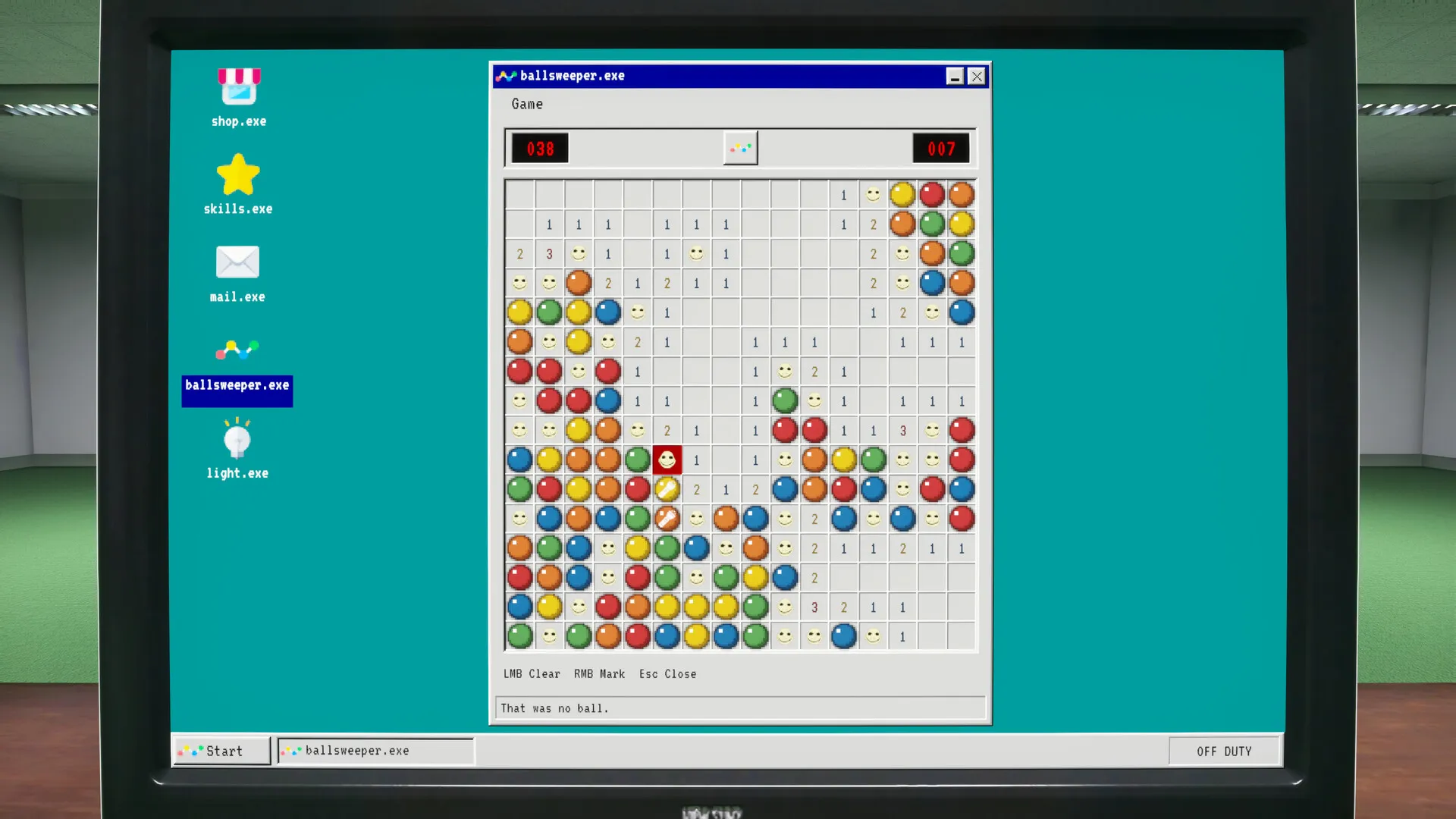
The Playrooms Support DLC adds Ballsweeper to your in-game computer and primarily exists to support developer Two Pixels UG. That matters if you’re deciding whether an extra purchase affects progression: the official description identifies an additional minigame without benefits relevant to the main game. The Playrooms Support DLC is optional, making its confirmed appeal straightforward—supporting the developer and getting that extra activity.
This guide covers the Windows Steam release using information reviewed through November 6, 2026. Both the base game and the DLC have a listed release date of November 4, 2026. The separate demo should not be used to establish how this add-on works in the full release.

Playrooms - Episode 1 - Full Game Release! — FalconPlaysGamesOfficial
Video source: Playrooms - Episode 1 - Full Game Release! — FalconPlaysGamesOfficial.
General full-release gameplay reference. This is not a dedicated tutorial, device test, or proof of this article’s particular mechanic. Exact patch is not identified.
| Detail | Confirmed information |
|---|---|
| Official product name | Playrooms - Support DLC |
| Developer and publisher | Two Pixels UG |
| Named additional content | Ballsweeper |
| Where the minigame appears | Your in-game computer |
| Main purpose | Supporting the developers |
| Listed release date | November 4, 2026 |
| Listed platform | Windows |
The official Playrooms Support DLC listing on Steam is the clearest source for its contents. It names Ballsweeper and explains the developer-support purpose. Although the description uses the word “expansion,” it also limits the advertised addition to a minigame.
That distinction sets reasonable expectations. The reviewed description does not advertise a new collection area, a set of equipment upgrades, or additional main-game progression. Its stated scope is small, and a purchase decision should reflect that scope.
How Ballsweeper Fits Into the Main Game
Ballsweeper’s confirmed objective is to collect all the balls while avoiding capture by the entity. The storefront places it on the computer inside the game. Those details establish its theme and location, but they do not provide enough information for a reliable strategy guide.
The reviewed material does not explain its complete rules, board layout, scoring, controls, or any rewards. A familiar-sounding title is not sufficient evidence to fill in those details. Likewise, the description does not establish the exact point at which the computer or minigame becomes accessible.
The base game has a much more clearly documented progression loop. You gather scattered balls, return them to ball pits, and use collected balls as currency. Filling pits unlocks abilities, while accumulating enough currency lets you obtain keys to subsequent areas.
| Feature | Base Playrooms | Support DLC |
|---|---|---|
| Main activity | Collect scattered balls and return them to pits | Play the additional Ballsweeper minigame |
| Progression described | Filled pits unlock abilities; currency helps obtain area keys | No main-game progression benefit advertised |
| Equipment described | Purchasable tools include a scoop and flashlight | No additional equipment advertised |
| Setting described | Rooms and corridors containing more than 200,000 balls | The in-game computer |
| Danger described | Lights go out after the shift; staying in light matters | Avoid being caught by the entity in Ballsweeper |
The Playrooms Support DLC description does not say that Ballsweeper earnings contribute to your main currency, fill ball pits, or unlock abilities. Treating the minigame as a shortcut through the collection work would therefore go beyond the evidence.
For example, someone trying to afford a key should look to the base game’s documented ball-collection system. Someone interested in an extra computer activity has a confirmed reason to investigate Ballsweeper. These are different goals, and the storefront only connects the DLC to the latter.
The base game’s danger options also belong to its own description. The reviewed sources do not explain whether those settings change Ballsweeper, so they should not be presented as minigame difficulty controls.
What the Playrooms Support DLC Offers Different Buyers
The strongest reason to consider the Playrooms Support DLC is that you want to give Two Pixels UG additional support and appreciate receiving a small playable extra. That purpose is explicit in the official description.
Evaluating it as a substantial content expansion would create expectations the available evidence cannot support. There is no confirmed additional campaign, collection route, or equipment package in the reviewed DLC description.
| What you want | What the evidence supports |
|---|---|
| An additional way to support Two Pixels UG | This is the DLC’s stated primary purpose |
| A computer minigame | Ballsweeper is explicitly included |
| More main-game progression | The description states no relevant gameplay benefit |
| A new set of areas or tools | Neither is advertised in the reviewed description |
| A price-based value comparison | The reviewed material contains no price |
Price remains an unanswered part of the decision. The captured storefront information does not include a regular price, discount, bundle offer, or regional amount. Consequently, there is no supported basis here for calling the add-on inexpensive or comparing its cost per hour with the base game.
Playtime is also unconfirmed. The sources provide no estimate for a Ballsweeper session, completing its objective, or exhausting its replay value. Any promised number of additional hours would be speculation.
Before deciding, keep three confirmed points together:
- Developer support is the stated purpose.
- Ballsweeper is the named extra.
- Main-game advantages are not part of the advertised offer.
The available evidence supports a contents guide, rather than a firsthand quality review. It does not establish whether Ballsweeper feels satisfying, how challenging it becomes, or how often players return to it. Those judgments would require experience or reporting beyond the reviewed material.
Platform Support and Listed PC Requirements
The Playrooms Support DLC storefront lists Windows support, with no macOS or Linux support listed. Its minimum and recommended hardware specifications match the reviewed base-game specifications for processor, memory, graphics, operating system, and DirectX.
Storage is the listed difference: the DLC page specifies 4 GB of available space, while the base-game page specifies 10 GB.
| Component | DLC minimum | DLC recommended |
|---|---|---|
| Operating system | Windows 10, 64-bit | Windows 10, 64-bit |
| Processor | Intel Core i5-7600K or AMD Ryzen 5 1600 | Intel Core i5-10400 or AMD Ryzen 5 3600 |
| Memory | 8 GB RAM | 16 GB RAM |
| Graphics | NVIDIA GTX 1060, 6 GB, or AMD RX 580 | NVIDIA RTX 2060, 6 GB, or AMD RX 5700 |
| DirectX | Version 11 | Version 11 |
| Available storage | 4 GB | 4 GB |
| Sound card | Standard | Standard |
These are storefront requirements, not measured performance results. They do not establish a particular frame rate, resolution, loading speed, or performance difference between the main game and Ballsweeper.
The storage figures also should not be presented as verified download sizes. The reviewed listings do not explain the combined installation footprint or how much additional data an existing installation downloads when the DLC is added.
The DLC’s listed features include single-player play, full controller support, Steam Achievements, and Family Sharing. Those labels describe storefront features, but they do not provide a detailed control guide or identify specific achievements added by Ballsweeper.
In particular, the Steam Achievements label alone cannot establish that the DLC contains exclusive achievements or that purchasing it is necessary for achievement completion. The reviewed material does not resolve either question.
For product identification, the base game is Steam app 5037510, while the Support DLC is app 5318320. The demo uses a separate app, 5246850. This distinction helps keep the correct release and add-on together when comparing listings.
What the November 6 Keyboard Fixes Confirm
Computer-minigame controls appear in both an official announcement and a community discussion, but the sources use different names. Keeping those names separate prevents a control report from becoming an unsupported DLC feature list.
The official November 6 patch notes say that Arcade and PitDash accept keyboard input again when opened with the mouse. That is a specific developer-confirmed correction. The announcement does not identify those names as alternative names for Ballsweeper or describe them as Support DLC contents.
| Source | What it establishes | What it does not establish |
|---|---|---|
| Official DLC description | Ballsweeper is the named additional minigame | Whether other computer activities belong to the DLC |
| Official November 6 patch notes | Keyboard input was restored for Arcade and PitDash after mouse-based opening | A named Ballsweeper-specific fix |
| Community report about a Snake game | One player reported an input problem and later said an update resolved it | Official DLC contents or the relationship between minigame names |
In the community report, a player said arrow keys selected desktop icons instead of controlling the activity they called a Snake game. The player subsequently edited the post to say it worked after an update. This is player experience, rather than a developer statement.
For someone encountering a similar keyboard problem, checking whether the November 6 update is installed is a reasonable first step because the official notes document a related input correction. However, the sources do not support promising that the patch fixes every computer-minigame control issue.
The Playrooms Support DLC content description remains the appropriate evidence for what the purchase includes. Neither the player’s wording nor the patch’s activity names expands that confirmed content list.
The November 6 announcement is the latest in the reviewed official feed. No semantic patch number is confirmed, so identifying the update by date is more accurate than assigning it a version number.
Related guides
- Steam & Platforms directory
- Playrooms Steam Release Date and Editions
- Playrooms Demo and Full Game Differences
Frequently Asked Questions
Is the Playrooms Support DLC required for the main game?
No. The reviewed official facts identify it as optional, and the storefront describes its purpose as supporting the developers while providing an additional minigame. It does not advertise advantages for the main collection and progression systems. Filling ball pits, obtaining abilities, purchasing equipment, and working toward area keys are described as base-game activities.
Where do you play Ballsweeper?
The official description places Ballsweeper on your in-game computer. It says the objective involves collecting all the balls while avoiding the entity. The reviewed material does not provide an exact menu path, an unlock condition, or a computer-location walkthrough, so those access details remain unconfirmed.
Are Snake and PitDash confirmed parts of the DLC?
Ballsweeper is the only minigame explicitly named in the reviewed DLC description. A community report refers to a Snake game, and the official November 6 patch notes refer to Arcade and PitDash. Those references do not establish which purchase includes each activity or whether any of the names refer to the same activity.
Does the Support DLC add achievements or progression rewards?
The storefront includes a Steam Achievements feature label, but the reviewed evidence does not identify DLC-exclusive achievements. It also does not document Ballsweeper rewards that affect currency, abilities, equipment, or area access. The developer describes the add-on as a support purchase with a bonus minigame, so any more specific reward claim would need additional confirmation.
Related Articles
community
Where to Find Playrooms Community Discussions
Searching for Playrooms reddit? Check the verified Steam game, separate demo advice, and see what is known about community discussions.
modes
Does Playrooms Have Co-op or Multiplayer?
Playrooms is listed as single-player. Learn what its developer said about possible multiplayer and what remains unconfirmed as of November 6, 2026.
platforms
Playrooms Demo and Full Game Differences
Compare the Playrooms demo with the full game, check PC requirements, and find confirmed fixes for lighting stalls and controller issues.
Was this helpful?
Thanks for the feedback!