
Playrooms Steam Release Date and Editions
Explore Playrooms on Steam: the November 4 release date, separate demo, optional Support DLC, Windows requirements, and confirmed launch features.
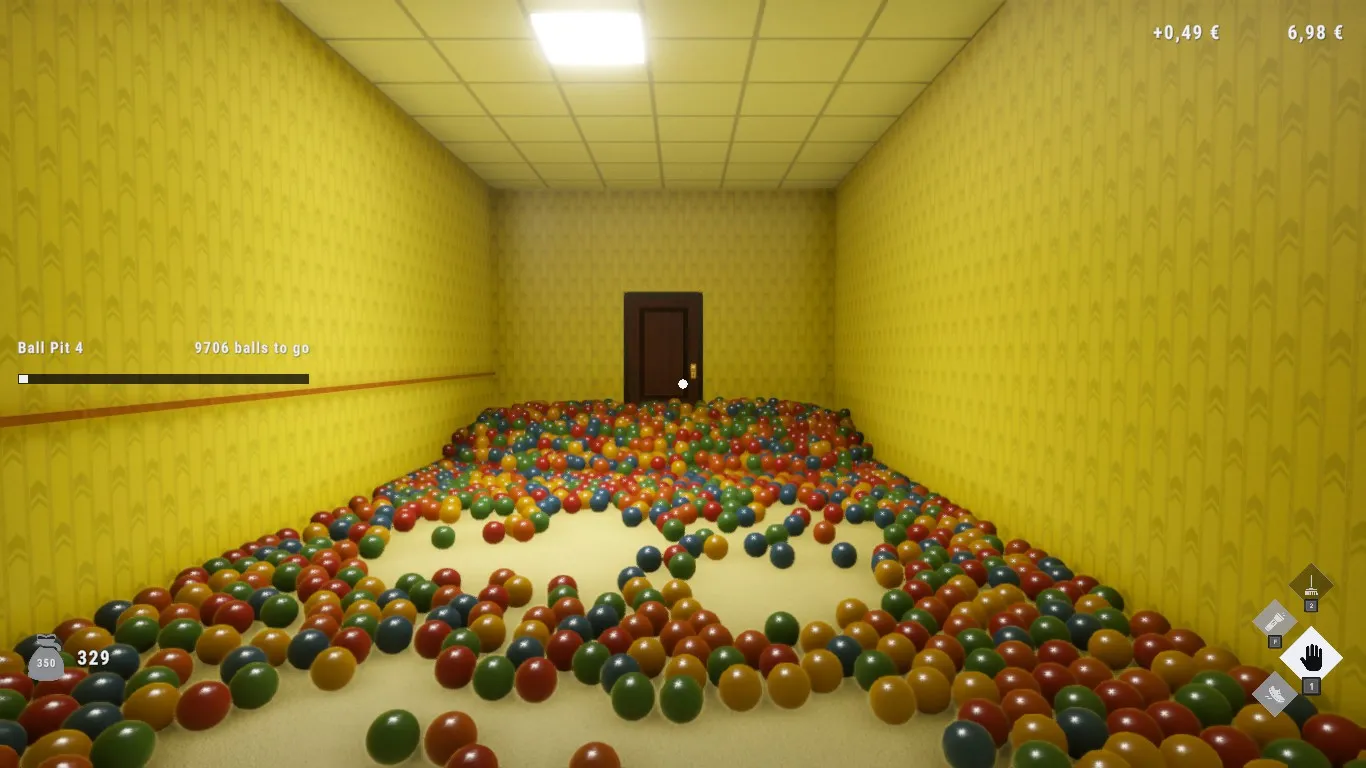
Is Playrooms on Steam, and what is its release date?
The Playrooms Steam release date is November 4, 2026, and the full game is available following its earlier launch delay. Choosing the right listing matters because the full game, demo, and optional Support DLC are separate products. This Playrooms Steam guide explains what each includes, which PC specifications are listed, and what to know before buying.
Developed and published by Two Pixels UG, Playrooms combines collecting scattered balls with an increasingly threatening workplace. You can find the full release on the official Playrooms Steam store page. The details below reflect the reviewed official information available for this November 6, 2026 guide.

Playrooms - Episode 1 - Full Game Release! — FalconPlaysGamesOfficial
Video source: Playrooms - Episode 1 - Full Game Release! — FalconPlaysGamesOfficial.
General full-release gameplay reference. This is not a dedicated tutorial, device test, or proof of this article’s particular mechanic. Exact patch is not identified.
| Release detail | Confirmed information |
|---|---|
| Full-game release date | November 4, 2026 |
| Developer and publisher | Two Pixels UG |
| Full-game Steam app ID | 5037510 |
| Listed operating system platform | Windows |
| Player configuration | Single-player |
The October 28 launch was delayed while the developers waited for Steam’s final review. Their announcements explained that the game was finished, but they could not release it without approval. A subsequent update confirmed approval, followed by the announcement that the game was available.
For Playrooms Steam release-date questions, November 4 is therefore the date to use. Earlier notices about waiting for approval describe the period before release. The demo’s October date also belongs to a different listing and should not be used as the full game’s launch date.
Which Playrooms Steam listing should you choose?
Start by deciding whether you want to try the game, purchase the complete experience, or support the developers through an additional minigame. The three reviewed storefront listings serve those different purposes.
| Steam listing | App ID | Release date | Purpose |
|---|---|---|---|
| Playrooms | 5037510 | November 4, 2026 | Full game |
| Playrooms Demo | 5246850 | October 12, 2026 | Separate demo |
| Playrooms – Support DLC | 5318320 | November 4, 2026 | Optional developer-support purchase with Ballsweeper |
The full game includes the expanded content described in the launch announcement: five new rooms, additional undisclosed locations, more equipment and upgrades, further threats, and the complete story. The demo provides a separate way to sample the premise, but its listing should not be treated as a complete specification for the released game.
The Support DLC adds Ballsweeper, a minigame accessed through the in-game computer. Its premise involves collecting balls while avoiding an entity. The developers describe this purchase primarily as a way to support their work, with an additional minigame rather than an essential addition to the main experience.
For a Playrooms Steam buying decision, the base game is the relevant purchase for the full story and room progression. The Support DLC is optional; the reviewed description does not identify it as a requirement for completing the main game.
What is confirmed about the price?
The developers announced a 20% launch discount. However, the reviewed material does not include the base price, a regional price table, or the promotion’s expiration date.
Check the displayed Steam price before purchasing. The launch announcement establishes that a discount was offered at release, but it does not establish the amount you will pay whenever you read this guide. No bundle pricing is confirmed in the reviewed references.
What do you actually do in Playrooms?
Playrooms gives you a straightforward assignment in an unsettling setting: collect balls scattered throughout the environment and return them to ball pits. The official description says there are more than 200,000 balls across the Playrooms.
Collecting supports progression in several ways. Filled pits unlock abilities, while collected balls serve as currency. That currency lets you acquire equipment and eventually afford the key needed to enter another area. Moving forward changes your surroundings while retaining the central cleanup task.
The environments described by the developers include tiled spaces, water, long corridors, and a hallway crowded with doors. Equipment includes a scoop and a flashlight, with the full release also introducing additional cleaning tools such as robots.
The danger becomes more pressing when a shift ends and lights begin shutting off. The storefront emphasizes remaining in illuminated areas as darkness spreads. It also describes options for adjusting how dangerous the job becomes, including an experience without fear and a harsher option with no second chances. Exact mode names and detailed rules are not supplied.
What does the full release add?
According to the launch announcement, the expanded experience includes:
- Five new rooms, plus other locations the developers chose not to reveal.
- Additional cleaning equipment, including robots.
- More upgrades for rooms and tools.
- Threats that were absent from the demo.
- A complete story with additional emails, secrets, and further contact from another presence.
- The ability to carry two tools simultaneously.
For a first Playrooms Steam session, the supported progression priorities are collecting balls, filling pits, acquiring useful equipment, and working toward the next area’s key. The references do not establish an optimal shopping order, upgrade costs, or a fastest route, so a precise spending walkthrough would go beyond the available evidence.
What are the Playrooms Steam PC requirements?
The full game lists Windows 10 64-bit, 8 GB of RAM, and 10 GB of available storage as minimum requirements. Its recommended specification raises memory to 16 GB and names newer processor and graphics options.
| Component | Minimum | Recommended |
|---|---|---|
| Operating system | Windows 10 64-bit | Windows 10 64-bit |
| Processor | Intel Core i5-7600K or AMD Ryzen 5 1600 | Intel Core i5-10400 or AMD Ryzen 5 3600 |
| Memory | 8 GB RAM | 16 GB RAM |
| Graphics | NVIDIA GTX 1060 with 6 GB or AMD RX 580 | NVIDIA RTX 2060 with 6 GB or AMD RX 5700 |
| DirectX | Version 11 | Version 11 |
| Available storage | 10 GB | 10 GB |
| Sound card | Standard | Standard |
Use the full-game storage figure when preparing to install it. The demo separately lists 4 GB of available space, which does not replace the full release’s 10 GB requirement. Available storage also should not be read as an exact download size.
The Playrooms Steam requirements provide hardware targets, but the reviewed listing does not attach a resolution, graphics preset, or frame-rate target to either specification. Meeting the recommended hardware therefore should not be described as a guarantee of a particular performance level.
Before purchasing, compare your processor, graphics card, RAM, and available disk space against the full-game column. The demo can help you assess its own performance on your computer, but its results cannot establish how every area of the expanded release will perform.
Which Steam features and launch extras are confirmed?
The full release lists controller support, cloud functionality, achievements, and several accessibility features. These details help establish what the storefront promises without importing settings from the separate demo.
| Feature | Full-game listing |
|---|---|
| Controller input | Full controller support, including listed DualShock and DualSense support |
| Achievements | Steam Achievements |
| Cloud functionality | Steam Cloud |
| Sharing | Family Sharing |
| Accessibility labels | Camera Comfort, Custom Volume Controls, Playable without Timed Input |
| Audio | Stereo and surround sound |
Those labels confirm the advertised categories, but they do not explain every implementation detail. For example, the listing does not specify which adjustments fall under Camera Comfort.
Saving deserves particular care when comparing editions. The demo lists Save Anytime among its features; that label is absent from the reviewed full-game category list. This difference does not prove that the full release lacks manual saving, but the demo label alone cannot confirm its saving behavior.
Whiteboard improvements and additional languages
The Playrooms Steam launch announcement describes a more capable whiteboard with drawing and erasing tools, lines, rectangles, circles, four brush sizes, and undo and redo controls. It also announces an achievement related to sorting balls by color, without providing its exact unlocking conditions.
French, Spanish, Italian, and Brazilian Portuguese were added for launch. The announcement identifies these as additions rather than supplying a complete language or voice-acting breakdown.
The one-billion-ball community event
The launch event asks players collectively to gather one billion balls by November 15. The developers state that collected balls contribute to the shared objective, with rewards tied to three milestones.
| Community milestone | Announced reward arrangement |
|---|---|
| 100,000,000 balls | Unlocks a reward for everyone |
| 500,000,000 balls | Unlocks another reward for everyone |
| 1,000,000,000 balls | Unlocks another reward for everyone |
The announcement keeps the reward identities secret until the milestones are reached. It does not supply a current total or establish which rewards have already unlocked. This shared collection event also does not change the storefront’s single-player designation.
Related guides
- Steam & Platforms directory
- Playrooms Demo and Full Game Differences
- Playrooms Minimum and Recommended PC Requirements
FAQ
What is the Playrooms Steam release date?
The full game released on November 4, 2026. Its separate demo released on October 12, 2026. Earlier announcements discussing the October launch delay concern the approval process before the full release became available. Use the November date when identifying the complete game.
Does Playrooms have multiplayer or co-op?
The reviewed official storefront lists Playrooms as single-player. It does not confirm co-op or another multiplayer mode. The community event combines players’ collected balls toward a global target, but that shared objective is not evidence that players can explore the same room together.
Does demo progress transfer to the full game?
Demo-to-full-game progress transfer is unconfirmed in the reviewed material. The demo and full release have separate Steam app IDs, and the references do not explain whether saves carry over. Do not assume that collected currency, unlocked areas, or other demo progress will transfer when purchasing.
Can you play Playrooms on Mac, Linux, or Steam Deck?
The reviewed storefront lists Windows support and does not list native macOS or Linux versions. Steam Deck verification and compatibility are also unconfirmed in these references. Full controller support describes an input feature; it does not, by itself, establish compatibility or expected performance on Steam Deck.
Related Articles
community
Where to Find Playrooms Community Discussions
Searching for Playrooms reddit? Check the verified Steam game, separate demo advice, and see what is known about community discussions.
modes
Does Playrooms Have Co-op or Multiplayer?
Playrooms is listed as single-player. Learn what its developer said about possible multiplayer and what remains unconfirmed as of November 6, 2026.
platforms
Playrooms Demo and Full Game Differences
Compare the Playrooms demo with the full game, check PC requirements, and find confirmed fixes for lighting stalls and controller issues.
Was this helpful?
Thanks for the feedback!