
Playrooms School Missing Balls and Silent Radar
Missing school balls with no radar pings? Check the lockers, learn what the November 6 patch fixed, and find out what remains unconfirmed.
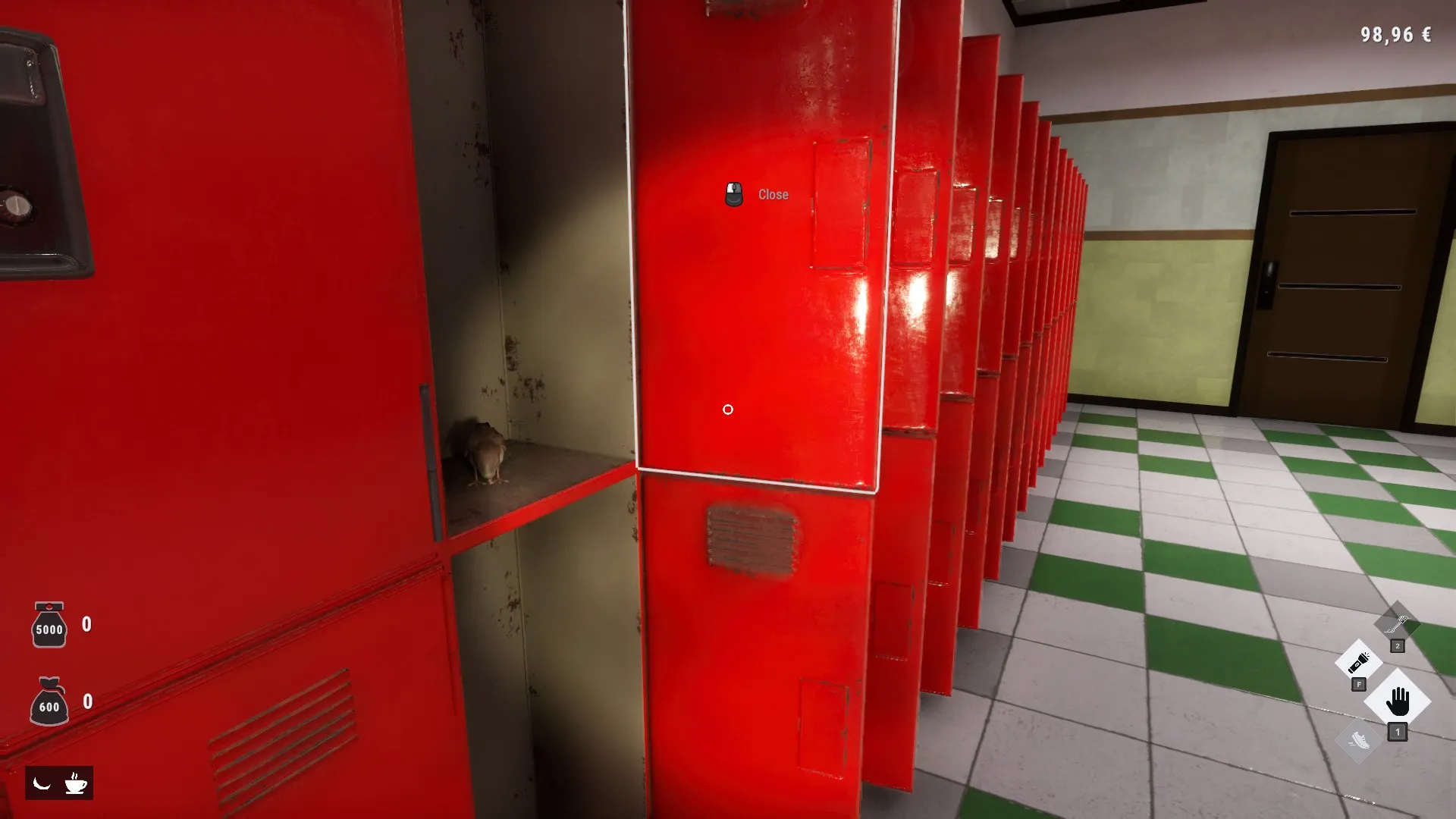
Why is the school still at 99.9% when the radar is silent?
If you searched for Playrooms school missing balls radar not detecting, start with the November 6 update and another check of the school lockers. Those last few balls matter because community reports describe incomplete schools despite silent scans, while the developer confirmed bugs affecting school completion. The Playrooms school missing balls radar not detecting problem has two useful leads: locker fountains and previously unreachable balls on the school TV.
The strongest practical advice is to revisit the lockers even if you remember opening every one. Players reported finding their final balls that way. Separately, the November 6 patch addressed balls disappearing into a sealed locker chamber and moved unreachable TV balls onto the pile below.

Playrooms - Episode 1 - Full Game Release! — FalconPlaysGamesOfficial
Video source: Playrooms - Episode 1 - Full Game Release! — FalconPlaysGamesOfficial.
General full-release gameplay reference. This is not a dedicated tutorial, device test, or proof of this article’s particular mechanic. Exact patch is not identified.
These findings explain why another radar sweep might leave you without an answer. They do not establish a complete technical explanation of how the scanner handles locker contents.
| What you are seeing | What the evidence supports | Where to focus |
|---|---|---|
| School completion remains at 99.9% | Community reports describe this exact situation | Recheck the lockers |
| The radar gives no pings | Players still found balls after reopening lockers | Interact with lockers despite the silent scan |
| A fully upgraded scanner finds nothing | One player reported this before finding the missing balls in a locker | Do not assume another upgrade is the answer |
| Balls were unreachable on the school TV | The November 6 patch relocated those balls | Inspect the pile below the TV after loading |
Treat that table as a way to prioritize your search, not a diagnosis of every incomplete school. The reports identify useful checks, but they do not prove that every missing ball comes from the same cause.
Work through the locker checks in order
For Playrooms school missing balls radar not detecting, the best-supported sequence combines the official fixes with the locker check described by multiple players. Start by making sure your installed game includes the November 6 update, then load your existing save and revisit the relevant locations.
| Order | Check | Why it belongs here |
|---|---|---|
| 1 | Make sure the November 6 update is installed | It addresses the confirmed school locker and TV problems |
| 2 | Load your existing save | The developer explicitly says the relocated TV balls update on load |
| 3 | Reopen the school lockers | Community reports describe missing balls appearing during a second inspection |
| 4 | Collect balls that appear in front of the lockers | The patched locker fountains place their balls there |
| 5 | Inspect the pile below the school TV | Previously unreachable TV balls were moved to that pile |
A second locker inspection is supported even when the first seemed complete. In the community reports about missing school balls, one player said the final two appeared while reopening lockers they believed they had already checked. Another described balls appearing only after the lockers were opened.
For a manageable search, work through the locker rows in a consistent order. That is an organizational suggestion based on the reported solution; the sources do not identify a special locker sequence, a particular interaction count, or a hidden condition you must satisfy.
One player experience also involved quitting, returning to the game, and finding two balls when checking the red lockers again. However, that player was guessing about why it worked. The report does not establish that restarting reliably restores missing balls or that only red lockers can be involved.
The practical distinction is simple: reopening lockers has support from several reports, while the proposed explanation involving balls returning to their starting positions remains speculation. If you try reloading, follow it with the actual locker check rather than assuming the reload alone completed the repair.
What the November 6 patch changed
The Playrooms school missing balls radar not detecting search results need to be read alongside the update date. Advice written around the original problem can describe behavior that the developer subsequently changed.
The official November 6 patch notes confirm several relevant corrections. They specifically state that the school can now reach full cleaning completion.
| Confirmed issue | Behavior described after the patch | Practical implication |
|---|---|---|
| Locker-fountain balls disappeared into a sealed chamber | Those balls land in front of the locker | Check the accessible area in front |
| “Reset balls” took away affected locker-fountain balls | That removal behavior was corrected | Older warnings about this specific bug are outdated |
| Lockers could not reopen while their sound faded | Reopening during the fading sound works again | That sound-related interaction restriction was fixed |
| Balls on the school TV were unreachable | Those balls sit on the pile below | Check the lower pile; existing saves receive this change on load |
The reset correction deserves particular attention. The November 6 notes say “Reset balls” no longer takes away the affected locker-fountain balls. Presenting the old removal bug as current behavior would misstate the patch.
At the same time, the notes do not say that using the reset option is required to finish the school. They also do not establish it as a guaranteed solution for every missing-ball report. Reopening the lockers and checking the relocated TV balls are the more directly supported checks.
The existing-save statement is specific: the relocated unreachable balls are updated when a save loads. Avoid expanding that into a promise that loading repairs every possible school issue. The patch provides a concrete correction for known placements, but it does not document every cause of incomplete progress.
Separate radar symptoms from confirmed bugs
A silent scanner is an observation; the reason behind it needs stronger evidence. With Playrooms school missing balls radar not detecting, the community reports and official patch notes support related but distinct conclusions.
Players described balls that were not detected during scanning and appeared when lockers reopened. The developer documented a sealed-chamber problem affecting locker fountains. Neither source provides a full specification of radar detection rules.
| Claim | Evidence status | How to interpret it |
|---|---|---|
| Players found missing balls by reopening lockers | Supported by multiple community reports | A useful troubleshooting step |
| The problem occurred with a maximum-level scanner | Reported by a player | Maximum upgrades did not resolve that reported case |
| Too many balls caused the fountains to back up | Speculation in a community post | Not a confirmed mechanic |
| Restarting returned balls to their original positions | A player’s proposed explanation | Not an established recovery system |
| Locker-fountain balls could disappear into a sealed chamber | Confirmed by the developer’s correction | A documented bug addressed by the patch |
This distinction matters when deciding what to do next. Repeatedly scanning the same empty-looking area may not address the situation described by players who recovered balls through locker interactions. But it would also be too broad to claim that the radar can never detect any ball associated with a locker.
The available material does not confirm detection range, whether walls affect scanning, or exactly when a locker-fountain ball becomes detectable. It also does not identify a separate radar fix in the November 6 notes.
Use the reported symptom to guide your checks without turning a community explanation into an official rule. In particular, claims about spawn limits or backed-up fountains should remain labeled as guesses.
What to report if the school remains incomplete
If Playrooms school missing balls radar not detecting still describes your game after the update and the location checks, the reviewed sources do not establish another guaranteed fix.
In the school 99.9% discussion, Two Pixels UG posted as the developer, indicated that the reported problems should be patched, and invited players to report continuing issues. That makes a clear account of what remains wrong more useful than repeating an unsupported workaround.
A useful report would include:
- The school completion percentage currently displayed.
- The number of missing balls, if known.
- Whether the radar produces any notifications.
- Whether your scanner is fully upgraded.
- Whether you reopened the lockers after updating.
- Whether you checked the pile below the school TV.
- Whether loading the save changed anything.
These are suggested reporting details drawn from the symptoms and checks already discussed. They are not additional game requirements.
There is no supported basis here for recommending save deletion or starting over. The documented TV correction works with existing saves, and the successful community reports describe continuing their current progress.
Likewise, reinstalling the game, changing scanner settings, or following a precise series of resets would go beyond the available evidence. If the documented checks fail, describe that outcome accurately rather than assuming your save is permanently damaged.
Related guides
- Troubleshooting directory
- Playrooms School Lockers, Collectibles, and Cleanup
- Playrooms Patch Notes and Launch Updates
FAQ
What is the first step for Playrooms school missing balls radar not detecting?
Make sure the November 6 update is installed, load your save, and reopen the school lockers. Community reports describe players finding their final balls during a second locker inspection despite receiving no radar pings. The patch also moved unreachable school TV balls to the pile below, so inspect that location if the school remains incomplete.
Should I upgrade the radar again to find the last balls?
The sources do not establish another radar upgrade as the solution. One player reported having a maximum-level scanner and still found the missing balls only after revisiting a locker. That experience supports checking the lockers even when scanning fails, but it does not prove a universal limitation affecting every locker or every scanner level.
Does “Reset balls” still remove the school locker balls?
The November 6 patch notes say the reset option no longer takes away the affected locker-fountain balls. Older descriptions of that bug should therefore be read in their original context. This correction does not mean resetting is mandatory, nor does it confirm that the option will recover every ball in every unresolved case.
Do I need a new save to reach 100% school completion?
The Playrooms school missing balls radar not detecting reports do not establish that a new save is necessary. The developer says the school can reach 100% after the fixes and explicitly states that existing saves receive the TV-ball relocation on load. Continue with the update and location checks before considering any loss of progress; persistent problems still need an individual report.
Related Articles
achievements
Playrooms Colour Is a Distraction Achievement
Plan your single-color ball pit in Playrooms with upgrade tips, wrong-color recovery advice, and developer statements alongside unresolved player reports.
achievements
Playrooms No Re-hires Needed Achievement
Learn why Playrooms' No re-hires needed achievement requires Hardcore completion, why deathless Normal runs fail, and what player reports confirm.
fixes
Playrooms Hotel Balls Stuck in the Ceiling
Fix unreachable hotel balls with the November 6 update. Learn what changed, how existing saves are affected, and why older vacuum advice may fail.
Was this helpful?
Thanks for the feedback!